


Resolving conflicts
with other extensions or browser settings
Are you seeing this message on every page you visit? If so, you have come to the right place!

Why am I seeing this message?
Rewarded Interest allows you to manage your privacy and consent choices across sites. Other extensions or tools may also manage your privacy settings. If we see something else trying to set your privacy settings, we show this warning so you know and can fix it.
When the settings in Rewarded Interest and another tool are incompatible with each other, the browser can get conflicting instructions. Your privacy settings may not properly represent your intent. This page identifies common conflicts and suggests how to resolve them.
Get started here


Ad blockers and Rewarded Interest
Start here if you are using AdBlock, AdBlock+, Ublock Origin or another ad blocking product.
Rewarded Interest is compatible with most ad blockers, but there are some features within the ad blocker that may conflict with Rewarded Interest.
Rewarded Interest works to manage your consent related to ads and content, but does not try to block the ads themselves. Ad blockers block or filter ads.
Some ad blockers also block trackers or offer the ability to block consent dialogs. This functionality interferes with Rewarded Interest's ability to set consent on some sites.
If you want to use Rewarded Interest and an ad blocker, it is recommended that you disable any option in the ad blocker to remove consent banners or trackers. Also, please note, if your ad blocker prevents all ads from showing, you will not earn any Rewards from Rewarded Interest.
Do Not Track and Rewarded Interest
Start here if you might have "Do Not Track" (DNT) on in Chrome.
Rewarded Interest manages your consent settings across all of your sites. Since Rewarded Interest has granular controls for different consent purposes, different companies, and can be configured on a per-site basis, it is generally not compatible with the binary (all on or all off), cross-site Do Not Track or DNT setting.
If you want to use DNT functionality, under "what companies are allowed to do" please select either "Block all" or use the "Customize..." option to enable the Do Not Sell / Global Privacy Control setting within Rewarded Interest. It can be found in the "Customize..." option for "What activities companies are allowed to do…" Navigate to the Behavior Based set of purposes and look for and enable the option "Do Not Sell / Global Privacy Control." Then disable DNT in your browser.
Please note, your Rewarded Interest anonymous ID (CMAID) has a separate control.
How to turn off Do Not Track in Chrome.
Select the "Settings..." option on the Chrome menu.

Select the "Privacy and security" option on the list on the left. Then select "Third-party cookies"

Then, make sure the Advanced option to "Send a 'Do Not Track' request...." is turned off (grey is off).

Reload webpages you are visiting. The conflict warning should no longer appear.
Start here if you might have "Do Not Track" (DNT) on in Edge.
Rewarded Interest manages your consent settings across all of your sites. Since Rewarded Interest has granular controls for different consent purposes, different companies, and can be configured on a per-site basis, it is generally not compatible with the binary (all on or all off), cross-site Do Not Track or DNT setting.
If you want to use DNT functionality, under "what companies are allowed to do" please select either "Block all" or use the "Customize..." option to enable the Do Not Sell / Global Privacy Control setting within Rewarded Interest. It can be found in the "Customize..." option for "What activities companies are allowed to do…" Navigate to the Behavior Based set of purposes and look for and enable the option "Do Not Sell / Global Privacy Control." Then disable DNT in your browser.
Please note, your Rewarded Interest anonymous ID (CMAID) has a separate control.
How to turn off Do Not Track in Edge.
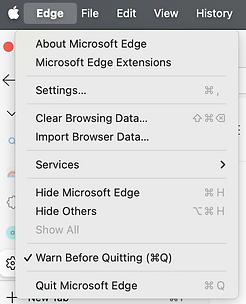
Select the "Settings..." option from the Edge menu.
Use the hamburger menu next to the title "Settings" and select, "Privacy, search, and services"


Select the "Privacy" option on the list.

Then, make sure the "Send 'Do Not Track' requests" is turned off (grey is off).

Reload webpages you are visiting. The conflict warning should no longer appear.
Global Privacy Control and Rewarded Interest
Start here if you use extensions like DuckDuckGo Search and Tracker Protection, Optery, or use the DuckDuckGo browser.
Rewarded Interest supports the Global Privacy Control (GPC). Other tools may send a conflicting signal.
Rewarded Interest manages your consent settings across all of your sites. Since Rewarded Interest has granular controls for different consent purposes, different companies, and can be configured on a per-site basis, it may conflict with other extensions that manage a blanket, cross-site implementation of Global Privacy Control (GPC).
If you want to use GPC functionality, please enable the Do Not Sell / Global Privacy Control setting within Rewarded Interest. It can be found in the "Customize..." option for "What activities companies are allowed to do…" Navigate to the Behavior Based set of purposes and look for the option "Do Not Sell / Global Privacy Control." Then, disable any other tools that may attempt to also set the Global Privacy Control.
To disable DNT in Duck Duck Go's browser or Extension
To disable DNT from Duck Duck Go's Browser and allow Rewarded Interest to manage it for you, follow these steps:
-
Open the Duck Duck Go extension in you browser (if you do not have the extension pinned you will have to find it in your browser's list of installed extensions).
-
Click the three dots (⋯) or the "gear" icon in the top-right corner to open Settings. A new tab will open.
-
Select Privacy from the left-hand sidebar.
-
Under the 'Options' section (second section from the top), find the "Global Privacy Control (GPC)" toggle..
-
Slide the toggle to the "off" position.
Start here if you use the Brave browser.
Rewarded Interest supports the Global Privacy Control (GPC). Other tools may send a conflicting signal.
Rewarded Interest manages your consent settings across all of your sites. Since Rewarded Interest has granular controls for different consent purposes, different companies, and can be configured on a per-site basis, it may conflict with other extensions that manage a blanket, cross-site implementation of Global Privacy Control (GPC).
If you want to use GPC functionality, please enable the Do Not Sell / Global Privacy Control setting within Rewarded Interest. It can be found in the "Customize..." option for "What activities companies are allowed to do…" Navigate to the Behavior Based set of purposes and look for the option "Do Not Sell / Global Privacy Control." Then, disable any other tools that may attempt to also set the Global Privacy Control.
To disable GPC in the Brave browser
Use the following instructions to turn off Global Privacy Control in Brave and allow Rewarded Interest to manage it:
-
Copy the following address: brave://flags/#brave-global-privacy-control-enabled
-
Paste it into your Brave address bar and press Enter.
-
The setting will be highlighted in yellow, allowing you to change it to Enabled or Disabled.

Once done, Rewarded Interest can manage your consent choices including the Global Privacy Control.